One page each morning that says what needs you.
Foreman is a small crew of Claude agents working out of a Notion workspace you own. It keeps a small architecture or design office on top of its mail, calendar, consultants, follow-ups and fees, and every morning and evening it writes one page: what do I need to decide or do today?
A foreman for a small crew
On a job site, the foreman knows what is happening today, who is waiting on whom, and what slipped yesterday. Foreman does that for an office, on a schedule, while you do the work.
7:30 am: the site walk
The morning page: the three things to decide today, money, what changed overnight, who you are waiting on, today's calendar, and the holes you might be missing.
Every hour: the punch list, kept
New items sorted, your notes acted on, consultants and contractors filed, replies noticed, and a follow-up drafted when someone goes quiet on an RFI or a fee proposal.
5:35 pm: the daily log
What moved, what's stuck, each project in a line, and tomorrow's first thing. On Fridays it is the week in review, with money and the ideas worth pursuing.
A morning at a made-up studio
Haskell Studio is invented for these pictures: one architect, a house under construction and a library in design. Every name and number is made up.
Three things to decide, before you open your email
The morning page leads with the few things only you can move today. Tick one when it's done and the row closes in Notion. Leave a note in plain words and the hourly agent acts on it.
What you're owed, and who you're waiting on
Each unpaid invoice from QuickBooks or Xero gets a row, and at 30 days a polite reminder is already in your drafts. Below it, everyone you're waiting on, with the days counted. A note like "Calling Sam at 10" goes to the hourly agent.
The problem before it's a problem
An RFI due Thursday with no structural answer yet. An insurance renewal nobody has started. Anything stuck for five days comes up to do or drop.
A place for ideas, kept apart from the to-do list
Type a task or an idea in the box. Ideas go to the Sketchbook, where the agents research them before the Friday review. The log shows when each agent last ran.
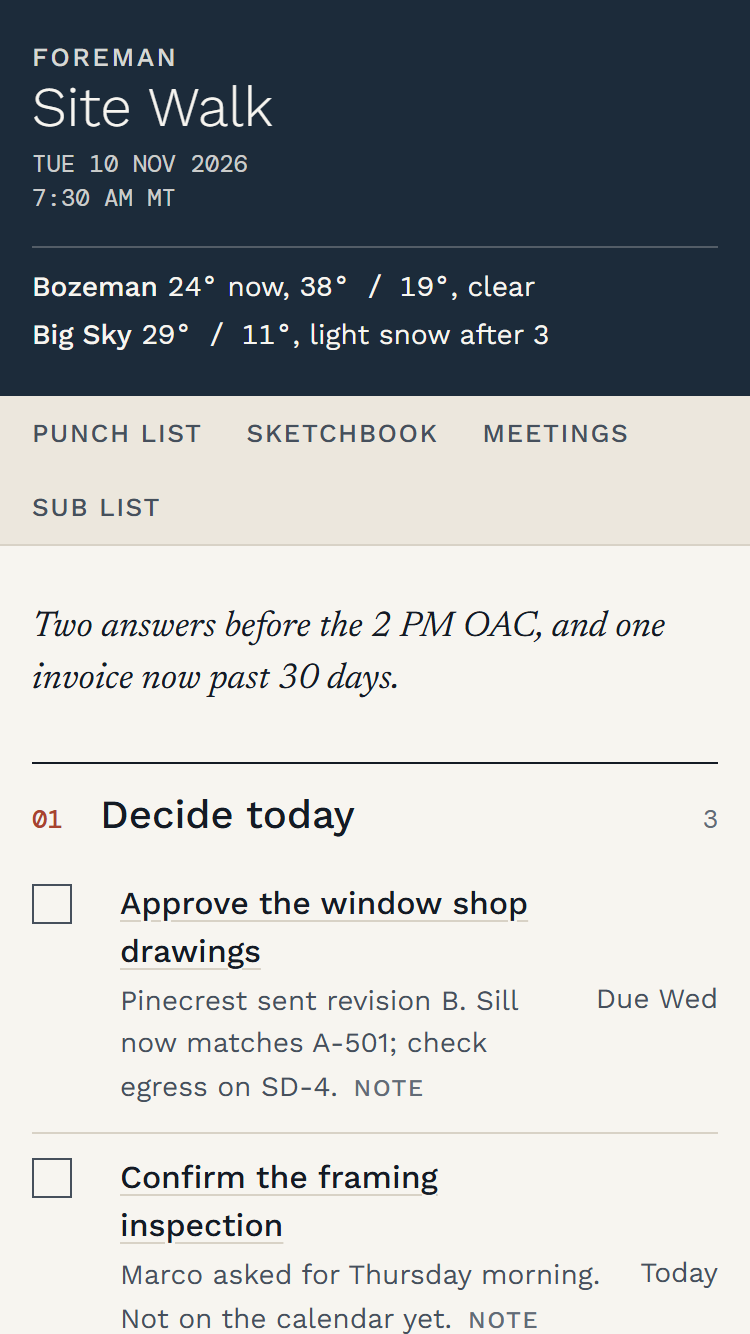
The same page on your phone
It's one pinned page in Claude. Read it at the desk, or on site before the OAC.
A crew, a page and a workspace
Everything installs into your own Claude and Notion accounts. All six agents are included. Setup asks which to turn on: Minutes needs your meeting recordings or notes, Clerk of Works a one-time Google sign-in, and Pay App your invoice notices.
- Agent · dailyHourly agentEvery hour on weekdays: sorts the Punch List, acts on the notes you leave, files contacts, notices replies and drafts follow-ups.
- Agent · dailySite Walk and Daily LogThe morning and evening pages. Friday's log is the weekly review.
- Agent · includedMinutesA prep page before each work meeting, and minutes with action items after it, from your meeting recordings or transcripts. Works with Plaud and Notion AI meeting notes. Drafts the minutes email for you to send.
- Agent · includedClerk of WorksWatches your website and Google listings: checks nightly that the site is up, and reads Analytics, Business Profile, Search Console and Ads. Read only; needs the Claude desktop app.
- Agent · includedPay AppOne Punch List row per unpaid invoice from QuickBooks Online or Xero, a month-end billing reminder, and a polite draft when an invoice runs 30 days late.
- The pageOne pinned page that works both waysTick boxes, a Note button on every row, Do it or Drop it on stale rows, an Add box for a task or an idea, your open ideas from the Sketchbook, and a strip showing when each agent last ran. Everything you do there lands in Notion.
- The workspaceA Notion templatePunch List, Sub List for contacts, Sketchbook for ideas and research, Meetings and a Run Log, with sample rows to learn from.
- SetupA setup script and a design guideOne script asks about your office and writes every agent's instructions. Three color themes for the page, and a guide to make your own.
Rules written into every agent
The crew prepares the work. You make the decisions and press the buttons.
It never sends email
It writes drafts. You read them and press Send.
It never touches your calendar
No accepting, declining, creating or moving events. When something belongs on the calendar, it adds a Punch List item for you.
It keeps private mail private
Medical, banking, personal and legal mail stays out of Notion, the drafts and the page. It never deletes anything, and an email that tries to give it orders is ignored.
Architects and design offices
Foreman was built in a working architecture practice and is in daily use there. It is made for one-person and small architecture, landscape and interior design offices: the principal is the designer, the project manager and the office manager at once, with consultants to chase, clients to answer, site visits and OAC meetings to prepare for, and invoices to send. It speaks that language: punch list, site walk, daily log, pay app.
- You needThe Claude desktop appOn Mac or Windows, on a paid Claude plan that includes Claude Code and scheduled tasks.
- You needA Notion accountThe free plan works.
- You needGoogle or Microsoft 365 mail and calendarGmail or Google Workspace, or a Microsoft 365 work or school account. Personal outlook.com addresses can't connect.
- You needNode, onceNode 18 or newer runs the setup script. It is a free download from nodejs.org.
- Good to knowIt runs on your computerThe agents run while the computer is awake and the Claude app is open. A run that comes due while it's closed happens the next time you open it.
- For MinutesPlaud or Notion AI meeting notesOnly if you turn on Minutes. Notion's meeting notes need AI meeting notes switched on for your workspace. Granola and Google Meet transcripts are coming.
Thirty to forty-five minutes, once
The kit comes with a written guide and a step-by-step setup video, sent with your purchase. Both walk through each step with a made-up office. Claude asks before it creates anything.
- Duplicate the Notion templateKeep the names; rename the sample projects to your own.
- Connect your accounts in ClaudeNotion, your mail and calendar, and Plaud if you use it for Minutes. The kit has a short guide for each.
- Collect your Notion linksClaude reads your copy of the template and prints one block of links.
- Run setupAnswer its questions about your office and paste the block. It writes everything to one folder.
- Publish and pin your pageClaude publishes the page to your sidebar; you allow it to reach Notion.
- Create the scheduled tasksClaude asks you to approve each one.
- Run it once to checkRun the hourly agent by hand and watch the page update.
Bought once, kept for good
No subscription. The kit includes twelve months of updates; keep using the version you have for as long as you like. Your Claude and Notion plans are billed by them, not by us.
All six agents, the page, the Notion template, the setup script and the design guide, for one office. You set it up with the guide and the video.
Everything in the kit, plus a 90-minute video call where we set it up together on your computer and your accounts. We write after your purchase to arrange a time.
Hear when Foreman opens
One note when checkout opens, nothing else.
This opens an email to [email protected] with your address in it.
Before you buy
Where does my mail and data go?
Nowhere new. The agents run in your Claude account on your computer and write to your Notion workspace. Incus Software never receives your mail, calendar or Notion content.
Is this made by Anthropic or Notion?
No. Foreman is made by Incus Software and runs on Claude and Notion. It is not affiliated with or endorsed by Anthropic, Notion, Google, Microsoft or Plaud.
Does it work with Outlook?
Yes, with a Microsoft 365 work or school account; personal outlook.com addresses can't connect to Claude. Outlook support is new and not yet proven in a working office, so Gmail and Google Calendar are the tested path. Where Claude can't place a draft in Outlook, the draft waits on your page to copy and send.
I use QuickBooks, not your billing software. Does Pay App work?
Yes. Pay App works from the invoice notices QuickBooks Online or Xero sends to your inbox. It doesn't need any other Incus software.
Do I need to write code?
No. Setup is one script that asks questions in plain words. You install Node once to run it. If you would rather not do it alone, choose the kit with a setup call.
Can I call it something else?
Yes. Setup asks what to name your assistant. Foreman is the default.
What if my computer is asleep when a run is due?
That run happens the next time the computer is awake and the Claude app is open. The page shows when each agent last ran, so a gap is easy to see.